
Squarespace is known for delivering a reliable 99.9% uptime, but like any online service, it can still experience the occasional outage.
When Squarespace goes down, your website might stop loading, e-commerce tools can fail to process orders, and features like domains, editing, or billing may temporarily stop working.
Most issues are resolved within minutes to a few hours, and users can track live updates on the Squarespace Status Page, via @SquarespaceHelp on X (Twitter), or through third-party outage trackers.
Knowing the signs of a potential outage — and understanding what steps to take when it happens — can help you reduce disruptions and keep your site running as smoothly as possible.
When Was The Last Time Squarespace Was Down?
The most recent Squarespace outages were:
- September 3, 2025: Some Commerce features were not loading correctly. The issue lasted for approximately three hours before it was resolved.
- September 2, 2025: Two separate issues occurred—one with the new domain registration page and another with Acuity Scheduling. Both issues were resolved in under an hour.
- August 28, 2025: Squarespace faced a minor issue that caused errors with billing and domain access. It continued for about two hours.
- August 26, 2025: A major connectivity issue affected many Squarespace websites for around one hour and 44 minutes.
You can always check Squarespace’s official status page or third-party trackers like StatusGator to see if a current issue is affecting your site.
Squarespace Uptime Overview
Squarespace has nearly 5 million unique subscribers all over the world, and most of the time, they don’t face any issues with their Squarespace websites. Squarespace generally maintains a very high level of uptime, with a reported 99.9% availability. This impressive reliability is a testament to the platform’s commitment to providing a stable and consistent user experience.
Squarespace’s strong infrastructure — with redundant data centers and advanced monitoring systems — is designed to keep your website stable, accessible, and running smoothly most of the time.
However, that doesn’t mean it’s flawless. Squarespace does experience occasional downtime, and even that small 0.1% of disruption can affect overall uptime and lead to brief periods where parts of the platform aren’t working as expected.
How To Know When Squarespace Goes Down?
As a basic thumb rule, you will know when Squarespace goes down when you see this message on the website:

This is a red flag that indicates that there’s something wrong either with your website or with Squarespace at large.
1. Check The Squarespace Status Page
The official Squarespace Status page is the first place to look for information on a Squarespace outage. This page provides real-time updates on the platform’s performance and any ongoing issues.
Here’s how it shows the current status of the Squarespace website when Squarespace goes down:
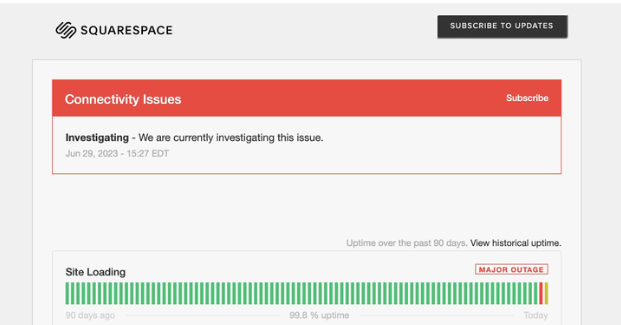
The status page uses a color-coded system to indicate the current state of Squarespace’s services:
- Green: All systems are operational.
- Yellow: There may be a disruption or degradation in service.
- Red: There is a significant service outage or incident.
When the status page shows a yellow or red indicator, it’s a clear sign that Squarespace is experiencing some form of downtime or disruption.
2. Contact Squarespace’s Twitter (X) Handle
The next way to know when Squarespace is down is by checking Squarespace’s Twitter handle.
Squarespace’s customer support team is active on their official Twitter handle, @SquarespaceHelp. You can tweet via your handle to get a reply of confirmation on the issue:

If Squarespace is dealing with a major outage, the company will typically share updates and announcements through its official support channels — especially on social platforms.
You can also search hashtags like #SquarespaceDown to quickly check whether other users are reporting the same issue. This is an easy way to confirm if the problem is widespread or limited to your own account or device.
3. Check On A Down Detector
While the Squarespace Status page is a reliable source, it’s always a good idea to cross-reference the information with a third-party service like Ookla’s Down Detector
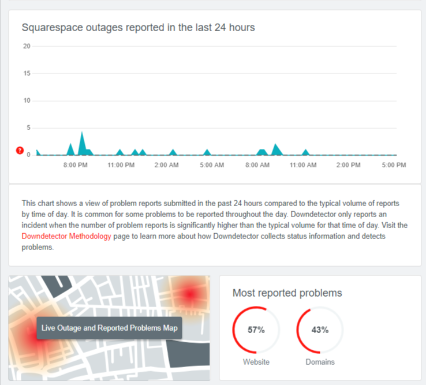
This platform collects user-reported outages and can provide a more comprehensive picture of the current situation.
Errors Faced When Squarespace Goes Down
When Squarespace experiences an outage, you may encounter various errors or disruptions, such as:
- Site Loading: Your website may fail to load or display properly, leaving visitors unable to access your content.
- Commerce: If you have an e-commerce integration, you may experience issues with processing orders, managing payments, or receiving notifications.
- Domains: Domain registration and management functions may be affected, preventing you from making changes or updates.
- Acuity Scheduling: If you use Squarespace’s integrated scheduling tool, Acuity, you may encounter booking or calendar-related issues.
- Accounts & Billing: You may face problems with accessing your Squarespace account, managing billing information, or making payments.
Common Causes For Squarespace Outage
Squarespace outages can occur due to a variety of reasons, including:
- Server or Infrastructure Issues: Problems with Squarespace’s servers, data centers, or other underlying infrastructure can lead to downtime.
- Scheduled Maintenance or Upgrades: Planned system updates or improvements can sometimes result in temporary service interruptions.
- Distributed Denial of Service (DDoS) Attacks: Malicious actors attempting to overwhelm Squarespace’s systems can cause outages.
Average Time For Which Squarespace Goes Down
Squarespace outages can last from 4 minutes to 2 hours. The length of the downtime depends on the severity of the underlying issue and the complexity of the resolution process.
It’s important to note that these are just general estimates, and the actual downtime can differ depending on the specific circumstances.
Past Instances When Squarespace Was Down
In the past, Squarespace has experienced a few notable outages, such as:
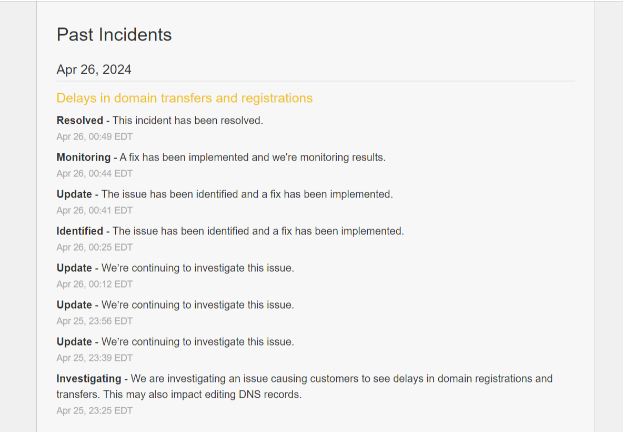
- Delays in Registering .com and .net Domains: In some instances, users reported delays in registering or managing their .com and .net domain names.
- Commerce Email Notifications Delays: Customers have occasionally experienced delays in receiving order confirmation and shipping notifications from Squarespace’s e-commerce features.
Here’s a look at the Squarespace status page, which shares updates on the recent issues faced and how they were resolved.
What To Do When Squarespace Goes Down?
While things may not be in your hands at the moment, there are a couple of things that you can do instead to learn more about the current issue.
1. Refer To Squarespace Help Center Guides
Squarespace has a comprehensive Help Center that provides a wealth of information and troubleshooting guides.

This can be a valuable resource to understand the issue and find potential workarounds.
2. Contact Customer Support
If the Help Center guides don’t resolve the problem, or if the outage persists for an extended period, don’t hesitate to contact Squarespace’s customer support team.

A customer support representative can provide more specific guidance and assistance to help you get your website back up and running.
Related Read:
Final Verdict: Check Squarespace’s Current Status and Report Outages on Its Official Status Page!
When Squarespace goes down, it’s natural to feel anxious and concerned about the impact on your website and business.
However, it’s important to remember that outages are not uncommon, and Squarespace has a track record of resolving issues promptly.
By staying informed, following the steps outlined in this article, and communicating with Squarespace’s support team, you can minimize the disruption and get your site back online as quickly as possible.
FAQs
Why is my Squarespace website not loading?
Your site may be down due to a platform-wide outage, server issues, or scheduled maintenance. Check the Squarespace Status page for updates.
How can I check if Squarespace is down?
Visit status.squarespace.com, check @SquarespaceHelp on Twitter, or use third-party tools like Down Detector.
What does the message “This page isn’t working” mean on Squarespace?
This usually signals a server or hosting issue, possibly caused by a temporary outage or high traffic.
How long do Squarespace outages usually last?
Outages typically last between 4 minutes to 2 hours, depending on the cause and severity.
Will my data be lost if Squarespace goes down?
No, your data is safe. Outages do not result in data loss; they only affect accessibility for a short time.
