
I have two reasons to believe you’re smart:
- You decided to build your website with our most recommended website builder, Squarespace.
- You came looking for this page — the Squarespace Coupon Code page. Hey, why let go of the free money, right?!
I also like to believe I am a fairly smart person who knows not getting to the point will lead to someone breaking my belief. So…
1. SBR10: Save 10% on Squarespace annual plans
Squarespace is often called “The Apple of Website Builders,” as we mentioned in our in-depth Squarespace review — and much like Apple, they rarely hand out discounts.
But here’s the good news: Squarespace has given us an exclusive offer just for our readers.
Use the promo code SBR10 to get an extra 10% off on top of any deal currently available on their site. This code works for first-time users who choose an annual plan.
Here’s a little table to show you how much you’ll save:
| Plan | Monthly Plans | Annual Plans | Annual Plans + SBR10 code |
|---|---|---|---|
| Personal | $16/month | $12/month | $10.8/month |
| Business | $26/month | $18/month | $16.2/month |
| Basic Commerce | $35/month | $26/month | $23.4/month |
| Advanced Commerce | $54/month | $40/month | $36.0/month |
You can basically save up to $18/month if compared to Squarespace monthly packages or up to $4/month on annual plans if you use SBR10.
2. 50% off for students
Squarespace has partnered with Student Beans to offer a 50% discount to current full-time students on its Personal, Business, and Commerce plans.
You can use this discount only if you’re a first-time user signing up for an annual plan, and it can’t be combined with any other offers.
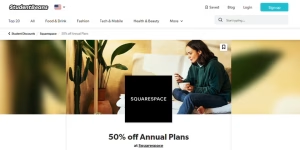
Squarespace has partnered with Student Beans to offer a 50% discount.
To receive the discount, you have to:
- Be a current full-time student.
- Sign up with Student Beans and verify your student status through their eligibility process.
- Go to the Student Beans Squarespace page & get the code.
The code you get is a single-use offer code that can be generated every 12 months.
3. Get up to 30% off by choosing to pay annually
Unless you simply want to explore everything Squarespace offers after the 14-day free trial, we’ve found it’s an excellent fit for almost anything — from a simple photography website to a full business site. check our Squarespace example websites), there’s no reason to get a monthly plan.
On the contrary, getting an annual package can help you save up to 30%!
| Plan | Monthly Plans | Annual Plans | Savings |
|---|---|---|---|
| Personal | $16/month | $12/month | 25% |
| Business | $26/month | $18/month | 30% |
| Basic Commerce | $35/month | $26/month | 25% |
| Advanced Commerce | $54/month | $40/month | 25% |
ChatGPT said:
Other Discounts
If you sign up for Squarespace’s free trial and don’t upgrade to premium once the trial ends, you may get a 20% off coupon code in your email. You may also see the same coupon code in the announcement bar of the official Squarespace site/dashboard.
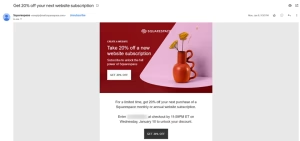
I got this email when I didn’t upgrade to a premium plan for one of the test sites.
However, this 20% off coupon isn’t always available. You are better off using one of the above methods to get the maximum possible discount if you don’t get it.
How to apply the Squarespace Promo Code?
It’s pretty straightforward but a bit different than your usual e-commerce purchase. To apply the Squarespace promo code:
- Sign up and start building your website (you get a 14-day free trial!).
- At the bottom of the editor, you’ll see the Subscribe button.
- Click it, and you’ll be asked to select a plan.
- Choose your preferred plan & enter all the billing information on the next page.
- Then comes the Review Order panel, where there’s an option to add a promo code.
That’s it. Add SBR10 or any discount code. Enjoy the savings!
About Squarespace — And Our Mini Review
Squarespace is the best all-around website builder, making it a strong choice for just about any type of site — whether you’re creating something for a small business, a personal blog, an online store, or a professional portfolio.
In many ways, Squarespace really is like the Apple of website builders: it’s intuitive and thoughtfully designed, the features feel polished, the templates look stunning, the platform is secure, and the editor offers plenty of flexibility and customization for most users.
Pros
- The Best Templates
Squarespace is known for its clean, modern, and mobile-friendly templates — and there are nearly 160 of them to choose from. All of them are free, all of them are beautifully designed, and in my opinion, Squarespace offers the best template selection of any DIY website builder out there.
- Powerful Features & Functionality
Squarespace isn’t just about great-looking designs — it’s packed with powerful features too. In fact, many of its tools outperform what other website builders offer. You get top-tier template customization, excellent blogging tools, built-in scheduling software, a smooth donation system, beautiful photo galleries, restaurant menu features, podcasting options, and more.
Plus, Squarespace has Squarespace Extensions, a curated marketplace of third-party add-ons that let you expand your site with extra functionality whenever you need it.
- Structured Drag and Drop Editor
Squarespace’s newer editor, Fluid Engine (released in July 2022), gives you the freedom to drag and drop blocks anywhere within a section. Everything snaps neatly to a grid, making it far more customizable than the old editor while still staying just as simple and intuitive to work with. You can even fine-tune the mobile version of your site using the same editor—just switch over to mobile view when you’re editing.
- Business and Marketing Tools
Squarespace isn’t just a website builder — it’s a complete online platform.
With tools for scheduling, email marketing, social media, SEO, memberships, and more, you can manage your entire online presence in one place. Because everything is built and maintained by Squarespace, all the features work together smoothly without the need for complicated integrations. - Easy To Use Ecommerce
The most powerful ecommerce website builder is Shopify— but Squarespace is easier to use. Squarespace’s ecommerce tools are a great option for anyone who finds Shopify overwhelming and just wants an easier, more approachable way to build a small- to mid-sized online store. It’s simple to use, flexible, and powerful enough for most growing shops.
- Intuitive Website Building Experience
Squarespace really feels like the Apple of website builders — intuitive, thoughtfully designed, and polished down to the smallest detail. They put real care into the user experience. For example, there’s a simple tool that lets you adjust the focal point of any image so it always looks perfect. And even the editor layout is smart: the toolbar sits at the bottom of the screen, giving you a clean, full view of your page while you work.
- Fast, Well-Versed Customer Support
Squarespace provides 24/7 email support and live chat from Monday to Friday, 4:00 AM to 8:00 PM ET. In my experience — and from what others have shared — the live chat team replies almost instantly and really knows their stuff. I’ve also emailed support a few times, and each time they got back to me within 30 minutes with clear, detailed answers. In one case, they even sent a screen recording showing exactly how to fix an issue on my test site, which was incredibly helpful. They also have super-quick social media support—I was looking at the @SquarespaceHelp Twitter replies, and they had replied to each relevant tweet in under an hour.
- Honest Pricing
Squarespace keeps its pricing honest and straightforward. The price you see advertised is the price you’ll actually pay—no hidden tricks or surprises, which is something I really appreciate.
Cons
- Learning Curve
One way to make software easy to use is to make it simple and not very customizable. That’s not Squarespace. While Squarespace is not “difficult to use”, it does have too many features to be the “easiest” website builder— the easiest website builder is Square Online which is more simple but also less powerful. You should expect a small learning curve with Squarespace— similar to learning Microsoft Word or Google Docs for the first time.
FAQ For Squarespace Coupon Codes, Promo Codes, And Deals
Where can I find the best Squarespace coupon codes?
You can find the best Squarespace coupon codes by browsing trusted deal sites or checking Squarespace’s official promo page. Be sure to look for exclusive offers so you can get the biggest possible savings on your plan.
Do Squarespace promo codes really work?
Yes, Squarespace promo codes are absolutely legit, and they can help you save a nice amount on your subscription. Just make sure the code is still active and works with the specific plan you want before applying it.
How do I apply a Squarespace promo code?
To use a Squarespace promo code, head to the checkout page and enter it in the promo box. Once applied, you’ll see the discount reflected in your total before you complete the purchase.
Are there any free Squarespace promo codes available?
While Squarespace doesn’t offer a free plan, you can still snag some great savings through promo codes, extended trials, and limited-time deals. Be sure to watch for seasonal promotions — they’re often the best way to get extra value.
What’s the best way to find Squarespace discount codes?
The easiest way to find Squarespace discount codes is to subscribe to newsletters, browse trusted coupon sites, or follow Squarespace on social media. They occasionally run flash sales and share exclusive promos you won’t want to miss.
Can I use multiple Squarespace promo codes at once?
Generally, Squarespace only allows one promo code per order. Be sure to pick the best available code before completing your checkout.
How often do Squarespace promo codes change?
Squarespace promo codes change throughout the year, especially during seasonal events like Black Friday or Cyber Monday. Since these deals rotate often, it’s always smart to check for fresh codes before you subscribe — you might catch a new offer and save even more.
Does Squarespace offer any student discounts?
Squarespace sometimes offers student discounts, but they’re not always active. It’s best to keep an eye on their website or join their newsletter so you’ll know right away when a new student deal becomes available.
What are the best Squarespace deals for new customers?
Squarespace does sometimes offer student discounts, but they aren’t always available year-round. The best way to stay updated is to check their website regularly or sign up for their newsletter so you’ll be notified whenever a new student promo goes live.
Are Squarespace promo codes valid for all subscription plans?
Most promo codes apply to both personal and business subscription plans, but always check the details of each code to make sure it works for the plan you need.
How can I get Squarespace deals for Black Friday?
Black Friday is one of the best times to grab great Squarespace deals. You can often find special promos or extended trials by checking trusted deal sites or visiting the official Squarespace website during the event.
How do I know if a Squarespace coupon code is still valid?
To make sure a Squarespace coupon code is still valid, check the expiration date listed with the code or try applying it at checkout. If it’s expired, you’ll see an error message.
Can I use Squarespace coupon codes on annual plans?
Yes, Squarespace coupon codes typically work on annual plans, but be sure to verify the terms and conditions of the promo code to confirm it applies to your chosen plan.
How long does Squarespace promo codes last?
Squarespace promo codes usually last for a few weeks or until the end of a specific promotion. Be sure to use the code before it expires to avoid missing out on discounts.
Where can I find the best Squarespace promo codes for business websites?
For business website deals, search for Squarespace promo codes that are specifically tailored to business plans. These codes often offer larger discounts or extended features for new business customers.
Does Squarespace offer promos or deals for existing users?
In general Squarespace doesn’t have a widely known deal for existing users to use.
